

TradiusPro Logo TradiusPro Logo TradiusPro Logo TradiusPro Logo TradiusPro Logo TradiusPro Logo TradiusPro Logo TradiusPro Logo TradiusPro Logo TradiusPro Logo TradiusPro Logo TradiusPro Logo TradiusPro Logo TradiusPro Logo TradiusPro Logo TradiusPro Logo TradiusPro Logo TradiusPro Logo TradiusPro Logo TradiusPro Logo TradiusPro Logo TradiusPro Logo TradiusPro Logo TradiusPro Logo TradiusPro Logo TradiusPro Logo TradiusPro Logo TradiusPro Logo TradiusPro Logo TradiusPro Logo TradiusPro Logo TradiusPro Logo TradiusPro Logo TradiusPro Logo TradiusPro Logo TradiusPro Logo TradiusPro Logo TradiusPro Logo TradiusPro Logo TradiusPro Logo TradiusPro Logo
THE TRADER’S WORKSPACEJournal. Practise. Understand.

YOUR TRADING, IN PERSPECTIVE

Every trade.
A clearer picture.

Journal your decisions, understand your performance and build a more deliberate trading process. One workspace for the trader you’re becoming.

Built for a more thoughtful trading process
TRADIUSPRO •••
Current TradiusPro Dashboard with performance metrics from the demo account
Demo account · Actual product interface

BRING YOUR TRADING HISTORY Zerodha Dhan MetaTrader 5 Nuvama Upstox Supported file imports

TWO WAYS TO MOVE FORWARD

Practise your edge.
Keep your journal connected.

From historical practice to live trade review, build a routine around the way you trade.

TRADIUSPRO BACKTESTING

The next candle.
Your next decision.

Replay historical price action, manage simulated orders and review saved session summaries.

Start Backtesting ↗ Free account required. Simulated trading.
T TRADIUSPRO BACKTESTING SIMULATION
GER40 5m EMA 20 Layout ▦
09:00 10:00 11:00 12:00
Random / Chronological ▶ Play Next bar →

Interface illustration · Simulated market data

YOUR PRACTICE. YOUR PACE.One candle at a time.
MT5 LIVE SYNC

Your terminal.
Meet your journal.

Bring entries, exits, scale-ins and stop-loss changes from MT5 into your trading history.

Set up from Profile ↗ Basic, Pro and active trials. Requires the EA in a running MT5 terminal.
M
MetaTrader 5Your trading terminal
Entry / ExitTrading activity
Scale-insPosition changes
SL / TPOrder updates
TRADIUSPRO SYNC EA
TradiusPro journalReady for your review
✓
Trade history Risk & reward Performance

How syncing works · Requires a connected EA
YOUR DAILY TRADING WORKSPACE

Your trading history.
Finally in perspective.

Keep your trades and performance together. See the numbers that matter, then trace them back to the decisions behind them.

  • Net and Gross P&L, fees and account funds
  • Win rate, risk/reward and trading streaks
  • Manual logging and broker-file imports
Explore the Dashboard ↗
TRADIUSPRO •••
Current TradiusPro Dashboard with performance metrics from the demo account
Demo account · Actual product interface

TURN REVIEW INTO A ROUTINE

Double down on
what actually works.

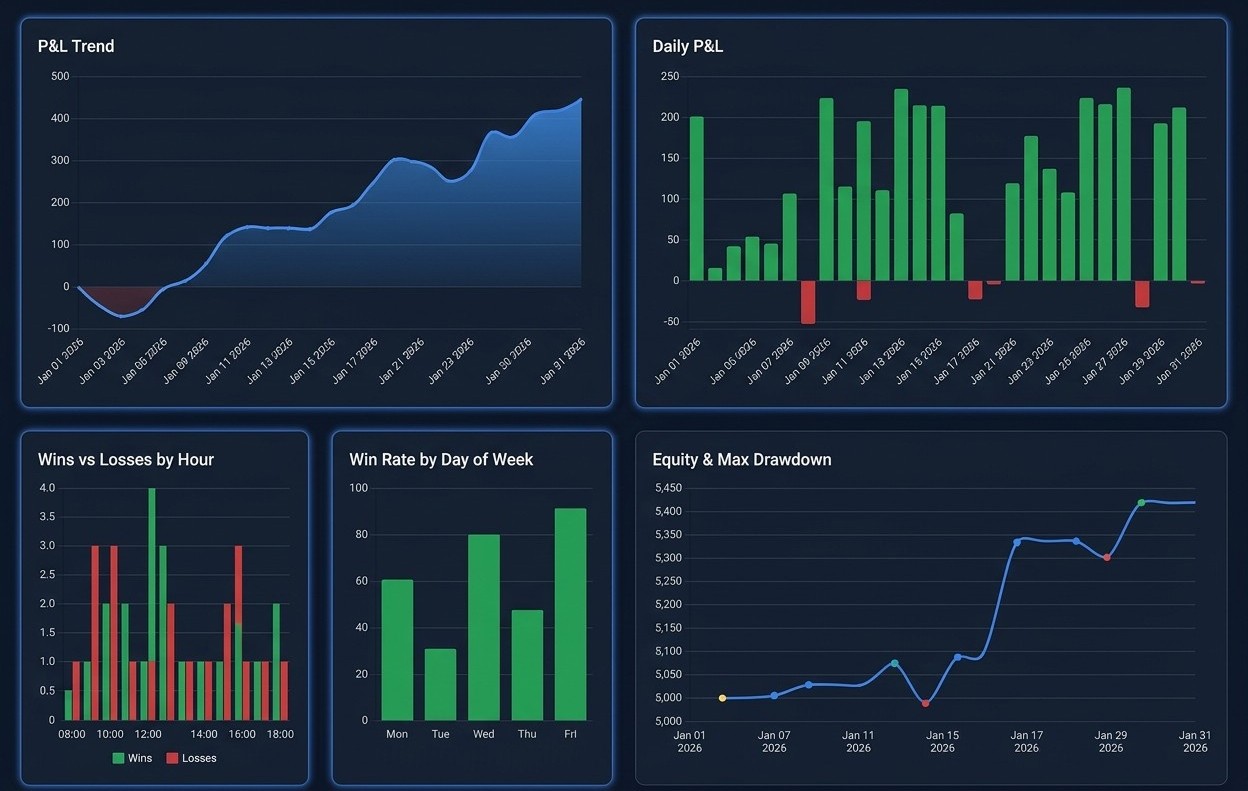
Look beyond a single winning trade. Compare your strategies, understand drawdowns and discover how your performance changes across time and markets.

  • Performance by strategy, symbol and time
  • Equity, drawdown and recovery analysis
  • Winning and losing trades in context
Explore Analytics ↗
TRADIUSPRO •••
TradiusPro P&L, daily performance, hourly wins and losses, and equity charts
Performance analytics · Illustrative data

REVISIT THE MOMENT

More than a result.
The story of your trade.

Study your chart screenshots alongside your executions and results. Filter the trades you want to review and build a visual record of your process.

  • Current trade cards with execution counts
  • Gross and Net P&L alongside chart screenshots
  • Filters for strategies, outcomes and mistakes
Explore Trade Blueprint ↗
TRADIUSPRO •••
Current Trade Blueprint filters and trade cards with execution counts, Gross and Net P&L
Demo account · Actual product interface

KEEP YOUR CURIOSITY

There’s always
more to understand.

Reflect on your own trading data. Build your knowledge. Bring what you learn back to the chart.

AI ASSISTANT

Make your history
a conversation.

Ask questions about your performance and explore patterns in your own trading data.

✦
What can I learn from my losing trades?
TRADIUSPRO AI ASSISTANT

Better questions.
Clearer insights.

Explore your strategies, holding times and recurring mistakes in the context of your trading history.

Strategy Risk / Reward Drawdowns
Ask about your trading…↑

Illustrative conversation · Available on Pro

Explore Pro insights ↗
TRADIUSPRO ACADEMY

Keep learning.
Keep building.

Explore technical analysis, risk management and the psychology behind your decisions.

▶ TRADIUSPRO ACADEMY
BUILD YOUR FOUNDATION

Knowledge behind
every decision.

Learn Practise Review
01
Risk managementProtect your process
02
Trading psychologyUnderstand your decisions

Learning topics · Illustrative course preview

Enter the Academy ↗

A FEW THINGS TO KNOW

Before you
get started.

Visit the Help Center ↗
Is Backtesting available with a free account?

Yes. Sign in or create a free TradiusPro account to practise with the instruments published by TradiusPro. Backtesting uses simulated trades.

How does MT5 Live Sync work?

Install and connect the TradiusPro EA in your MT5 terminal, then manage your connection from Profile. Sync is available on Basic, Pro and active trials. Your terminal and EA must be running to send trading activity.

Can I import trades from my broker?

You can upload supported broker tradebooks and transaction files, including formats for Zerodha, Dhan and MetaTrader 5. Check the Help Center for the current import instructions.

Can I try the journal before signing up?

Yes. The Dashboard, Analytics and Trade Blueprint demos let you explore sample trading data. Demo pages are read-only.

Can I keep my trading accounts separate?

Yes. You can switch between trading accounts to review your personal, evaluation or funded-account performance separately.

YOUR NEXT CHAPTER STARTS WITH A TRADE

Make it one
you can learn from.

Journal your decisions. Practise your setups. Understand your performance.

Explore the demo →
No credit card required to create a free account.